MissNoti 2.2 Update - Chat Notifications Like a Conversation, and Quarantine
MissNoti 2.2 brings two changes. Notifications from chat apps are now organized by sender, just like a chat app, and a new Quarantine keeps notifications that never actually show up on your screen in a separate place.
1. Read chat notifications like a conversation
The notification screen for messaging apps is now organized around who sent each message. Until now, notifications were simply listed in the order they arrived, so when several conversations were going at once, it was hard to tell who said what.
From 2.2, messages are grouped by person, just like in the chat apps you use every day, so catching up on missed conversations is much easier.
2. Quarantine
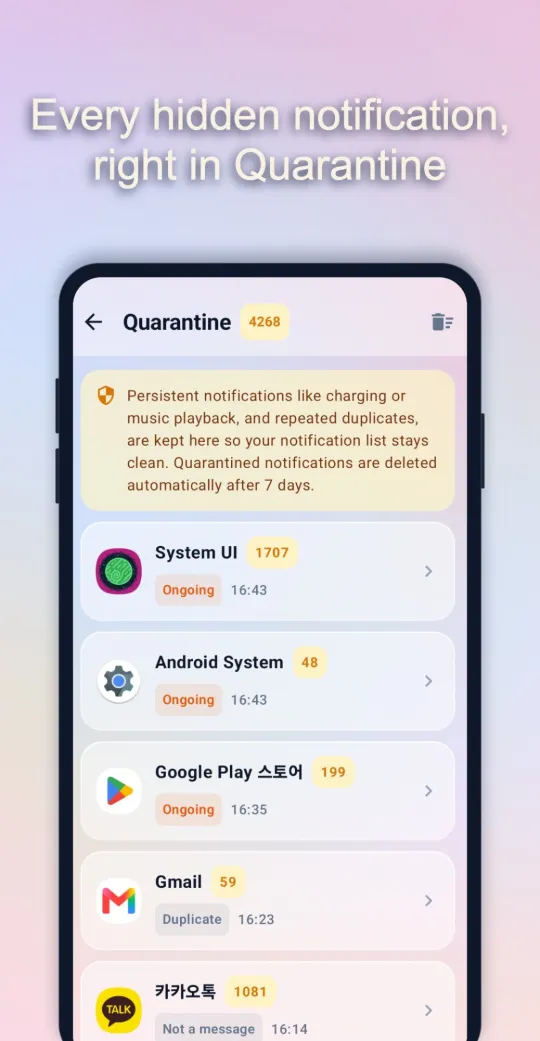
Your phone receives more notifications than you might think. Persistent ones like charging status or music playback, system notifications, and empty notifications all come in as notifications, even though you never actually see them. When they mix into your list, the ones that matter get buried.
Quarantine collects these hidden notifications away from your regular list. They’re grouped by app, with a label showing why each one was quarantined.
- Ongoing: Notifications that stay on screen, like charging, music playback, or downloads
- Duplicate: The same notification arriving again and again
- Not a message: Notifications from chat apps that aren’t conversation messages
Quarantined notifications are deleted automatically after 7 days, so they won’t eat up storage. Open it sometime if you’re curious how many hidden notifications your apps are sending. The numbers may surprise you.
For everything else MissNoti can do, see How to use MissNoti.

Comments